 SOUTH AFRICA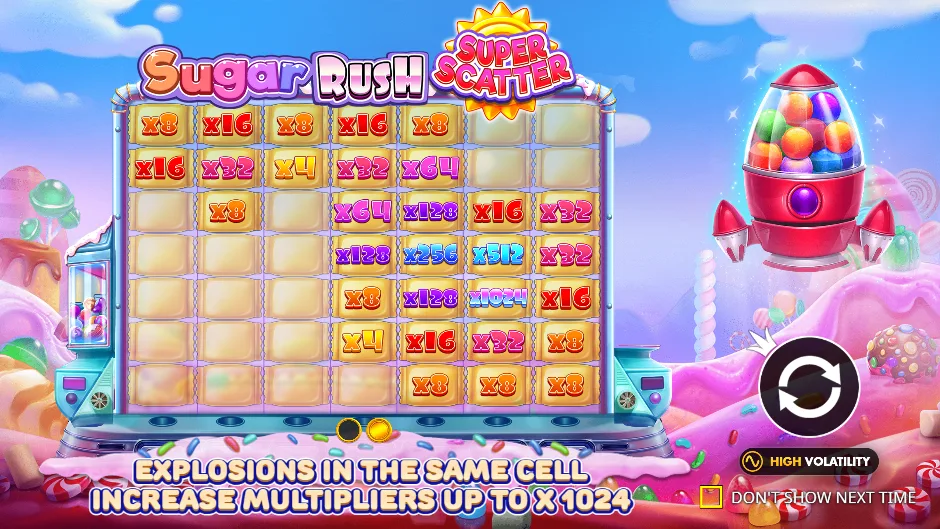
Virtual credits only. The game contacts the external provider after you load it.
Captured currency: USD. Official provider page ↗ · Choose the other demo.
Can I play Super Scatter free without registering?
The public provider demo embedded here does not require an operator account on this guide. Choose Load demo and follow the provider’s own introduction or consent controls. The virtual balance belongs to that practice client. It is not a deposit, an account-opening reward or credit that can be withdrawn later.
“Free play” here means virtual-credit practice in the Super Scatter client. It does not mean promotional real-money free spins, a no-deposit offer or an account funded by the provider. The practice currency and available menus are visible inside the game; read them before trying a purchase.
A provider may restrict access by location, browser or its own rules. If the frame does not become usable, use the official provider link or the loading checklist. Registering at an unrelated site, installing an unofficial APK or repeatedly clicking a blocked frame is not a remedy this guide recommends.
Make your first practice spin count
Start by reading the game title and finding the information control. The screenshots in this guide show a large starting virtual balance, but that is a practice balance, not money you can withdraw. It can make a feature look cheaper than it would feel in a real session, so read the full purchase price before trying either buy.
Choose the base stake with the game’s stake controls, then use the ordinary spin button. Watch one complete tumble sequence before changing anything else. The grid may refill several times while the round remains open. Wait for the final round amount and the controls to become available again; repeated tapping during an animation is not a reliable way to count paid spins.
If you want to inspect Bonus Buy, read the quoted cost and the confirmation before accepting. Practice purchases also use virtual credits. A larger hypothetical return after a purchase is not automatically a profit: compare it with the full purchase cost, not with one small base spin. The rand calculator makes that comparison without taking a bet.
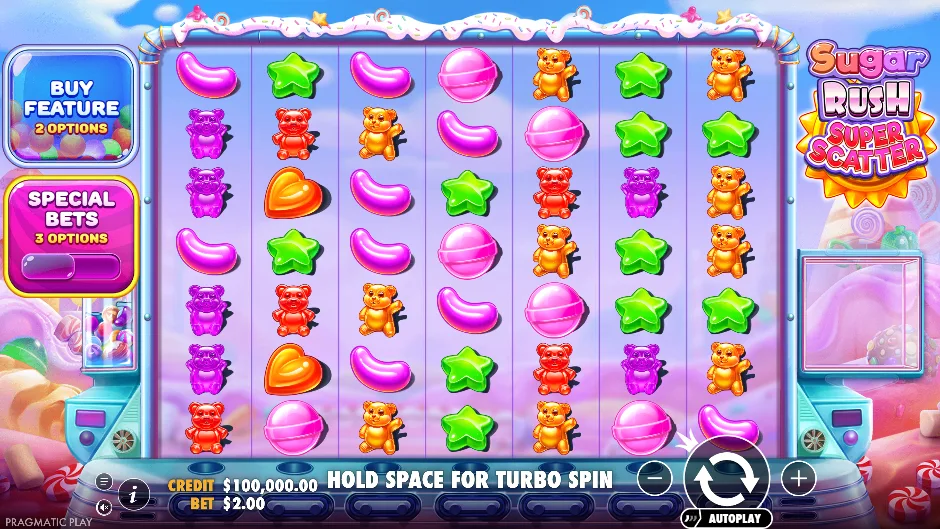 12345
12345- Grid: seven columns and seven rows. Adjacent matching sweets form paying clusters.
- Bet: the full stake for one paid spin. Credit is the virtual balance, not a prize.
- Spin: begins the paid round. The adjacent − / + controls change the stake.
- Information: opens this version’s paytable and rules.
- Buy feature: a separate, larger debit; read the cost before confirming.
Can I play this demo in rands?
The official provider launch used for our captured demo displays USD. We keep that visible rather than relabelling dollars as rand. A real-money operator may offer a different account or game currency, and you should read the currency inside that specific client before placing a stake.
For learning the ratios, a worked example does not need a live exchange rate: a 100× buy at a hypothetical R2 base stake costs R200, and a 500× buy costs R1,000. This compares multiples of a stake. It does not say that the demo’s $2 has a cash value of R2 or that its balance can be transferred to an operator.
Searching for “demo in rands” should lead to a clear currency answer, rather than a screen whose currency has been silently changed in a caption. Use this demo to learn the controls and use the operator checks to establish the actual account currency.
Practice the feature without confusing the versions
The Super Scatter logo and the Special Bets menu identify this edition. To compare the 1000 edition’s standard and Super Free Spins purchases, open the Sugar Rush 1000 demo. Switching games replaces the active client instead of running a second game invisibly.
To practise the feature entry, use this Super Scatter client’s Buy Feature menu and read its virtual-credit quote. For a special scatter award, inspect the separate rule: at least three total scatter symbols are needed, with the award determined by the qualifying Super Scatter count. A practice feature purchase is not proof that a particular Super Scatter combination will land.
Special Bets is a different menu from Buy Feature. Super Spin 1 starts random positions with multipliers from 2× to 128×; Super Spin 2 starts every position at 32×. Those are enhanced paid demo actions with their own quotes, rather than free-spin purchases. At the captured $2 ordinary base bet, the menu quotes $20 and $500 respectively. Inspect those prices before choosing a mode.
The provider may show its own introduction, consent or access message. Keep the game’s controls available, mute its sound if needed, and use full screen on a small phone when the stake labels are cramped. Closing the demo removes its frame; returning to it may start a new virtual session.
A useful five-minute Super Scatter practice route
First, locate the full title, CREDIT, BET, spin button and information panel. Read the balance and stake separately. Make sure you can close the demo or return from full screen before changing any settings. This first pass is about understanding the interface, not achieving a target win.
Second, open the rules for ordinary scatters and Super Scatters. Check the minimum total number of scatter symbols needed for feature entry, then compare that with the instant-award table. Next inspect Special Bets separately from Buy Feature. At the captured $2 base bet, a $500 Super Spin 2 quote is a 250× debit, not a 250× prize.
Third, repeat the interface checks on your actual phone if that is where you intend to play. Try portrait and landscape, mute the sound and open the information panel at its normal size. A game that starts but hides the stake behind browser chrome is not yet a useful practice setup. The mobile checklist helps you identify exactly what failed.
There is no need to chase a particular feature to finish learning the controls. A short demo session cannot establish a bonus frequency or a winning strategy. You can inspect the documented feature rules and RTP settings directly instead of treating a few practice outcomes as a statistical test.
Demo not loading? Follow the screen you can see
| What you see | What to do |
|---|---|
| An introduction with a circular arrow | Wait for the resources to finish loading, then use the game’s own start arrow. The introduction is not yet the playable grid. |
| A blank or stalled panel | Use “Close demo”, then retry once on a stable connection. If the provider shows an error, read it rather than clicking repeatedly. |
| Provider access or location restriction | Use the official provider page to see its current access message. This guide does not bypass restrictions or provide replacement sessions. |
| Stake or spin control is cut off | Use the full-screen control, then test phone orientation. The game panel reserves its own space to avoid layout jumps. |
| A different title appears | Close it and choose the correct game below; compare the logo and full title before practising. |
If embedding is unavailable in your browser, open the official provider page. We keep that source link separate from the partner action. It may still be restricted by the provider; an external link is an alternative access path, not a guarantee.
Your questions, answered
Is this a real-money game?
The embedded client is the provider public demo. Its credits and prizes have no cash value.
Do I need a demo account?
Our inspected public provider flow did not require an operator login. Provider age/consent and access controls can still appear.
Can I reproduce a demo win after depositing?
A completed demo result does not predict a later real-money outcome. Treat the demo as a way to learn the interface and feature conditions.
Is this the same demo as iBets or another catalogue?
We launch the public provider client for the named title. Other catalogue pages can use a different build or configuration; check their displayed title, mode and rules.